Onboarding to use TP_DocuSign_GCP
Onboarding a Customer
To onboard a new customer/financial institution, complete these steps:
- Create the service account user for the customer within DocuSign. The customer completes this step.
- Fetch customer user information from DocuSign needed for the integration. The customer completes this step, and then sends the information to Jack Henry.
- Log in to the service account in DocuSign, and then complete the OAuth User Authorization flow. The customer completes this step.
- Update translation configuration to add information from Step #2. Jack Henry completes this step.
Step 1: Creating a User for the integration
Each Customer/Financial Institution needing to use JHA’s DocuSign provider must have an account with DocuSign.
New Users can be added via the DocuSign Admin Dashboard at:
After the account is created, additional users can be added. It is recommended that there be a generic service account with an email address attached to the account. Use this generic service account to grant access to the translation layer to act on behalf of the DocuSign account.
Step 2: Obtain Customer User information
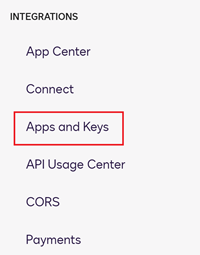
There are 3 pieces of data needed from this site for configuration that can be found on the Settings page under Integrations:Apps and Keys.
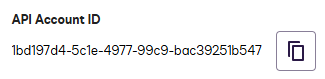
API Account Id
This is available near the top of the Admin->INTEGRATIONS->Apps and Keys page in DocuSign
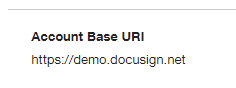
BaseUri
This is available near the top of the Admin->INTEGRATIONS->Apps and Keys page in DocuSign
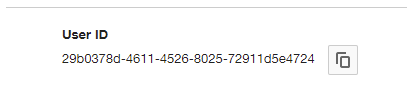
DocuSignUserId
This is the value from the box labeled “My Account Information”
After obtaining this information, provide it to your Jack Henry contact. These pieces of data are not considered sensitive information.
Step 3: OAuth User Authorization
After the account outlined in Step 1 is created, the customer must grant Jack Henry’s translation service access to the translation layer.
This step is accomplished by logging in as the new service account user. Then, visit one of the following URLs (depending on which JH environment a customer is integrating with):
It also possible to visit the links directly, and then log in to DocuSign.
When granting access, the newly created generic service account must be used.
- Have a how-to question? Seeing a weird error? Get help on StackOverflow.
- Register for the Developer Office Hours where we answer technical Q&A from the audience.